5 Dec 2011

ActiveMQ: LDAP based authentication and authorization

The FuseSource ActiveMQ Security Guide has two great chapters on how to configure ActiveMQ for authentication and authorization against an LDAP server. Chapter 5 even has a tutorial that contains step-by-step instructions on how to configure your LDAP server and ActiveMQ based on ApacheDS, an open-source LDAP server. If you need to secure your ActiveMQ broker, then I highly recommend this documentation.

The tutorial in the Security Guide shows the relevant configuration needed so that every JMS connection into the broker is authenticated and checked for authorization against the security information stored in an LDAP server.

Sometimes you may want to allow anonymous access to certain destinations on your broker that are not critical while securing access to your critical destinations.  In this post I like to outline a possible solution for such use-case. I will assume the reader is generally familiar with LDAP based authentication and authorization in ActiveMQ. If not, I suggest to first consult the ActiveMQ Security Guide.


When configuring ActiveMQ for JAAS based authentication against an LDAP server, the file login.config could read as follows (pretty much a copy-and-paste from the FuseSource Security Guide):


/** JAAS LoginModule that uses LDAP based authentication.

Every connection into broker must supply username and password

for authentication to succeed. Anonymous access not allowed.

*/

LDAPLogin {

  org.apache.activemq.jaas.LDAPLoginModule required

  debug=true

  initialContextFactory=com.sun.jndi.ldap.LdapCtxFactory

  connectionURL="ldap://localhost:10389"

  connectionUsername="uid=admin,ou=system"

  connectionPassword=secret

  connectionProtocol=""

  authentication=simple

  userBase="ou=User,ou=ActiveMQ,ou=system"

  userSearchMatching="(uid={0})"

  userSearchSubtree=false

  roleBase="ou=Group,ou=ActiveMQ,ou=system"

  roleName=cn

  roleSearchMatching="(member=uid={1})"

  roleSearchSubtree=false;

};

The broker then needs to use the JAAS authentication plug-in referencing the LDAPLogin authentication realm:


<plugins>

  <jaasAuthenticationPlugin configuration="LDAPLogin" />

</plugins>


Using such configuration, every JMS connection will be authenticated using the LDAPLoginModule, no matter if it provides a username and password. Needless to say the authentication will fail if no username/password is supplied. Anonymous access won't be allowed in this configuration.

So in order to also allow anonymous access to the broker we can leverage the ActiveMQ GuestLoginModule.
The GuestLoginModule allows JMS connections that are not configured for username/password to still access a secured broker. It is typically used in conjunction with other JAAS login modules and basically successfully authenticates a JMS connection using a configurable username and group name. Here is a sample configuration of this login module:


org.apache.activemq.jaas.GuestLoginModule sufficient

    debug=true

    org.apache.activemq.jaas.guest.user="guest"

    org.apache.activemq.jaas.guest.group="guests";

Authentication will succeed even if no username/password was supplied by the JMS client. Clients will be authenticated as user "guest" and belong to the group "guests". As you see, these names are configurable.

In JAAS configuration, multiple login modules can be combined in one JAAS authentication realm. They will then be tried in order.

The basic idea is to configure authentication so that the broker first invokes the GuestLoginModule, before trying the LDAPLoginModule. Here is the configuration:


/** JAAS LoginModule configuration that combines LDAPLoginModule with

  GuestLoginModule. 

  LoginModules can be combined in JAAS.

  See http://fusesource.com/docs/broker/5.5/security/Auth-JAAS-GuestLoginModule.html

  for more information.

*/

LDAPLogin-with-Anon-Access {

  org.apache.activemq.jaas.GuestLoginModule sufficient

    debug=true

    credentialsInvalidate=true

    org.apache.activemq.jaas.guest.user="guest"

    org.apache.activemq.jaas.guest.group="guests";


  org.apache.activemq.jaas.LDAPLoginModule requisite

    debug=true

    initialContextFactory=com.sun.jndi.ldap.LdapCtxFactory

    connectionURL="ldap://localhost:10389"

    connectionUsername="uid=admin,ou=system"

    connectionPassword=secret

    connectionProtocol=""

    authentication=simple

    userBase="ou=User,ou=ActiveMQ,ou=system"

    userSearchMatching="(uid={0})"

    userSearchSubtree=false

    roleBase="ou=Group,ou=ActiveMQ,ou=system"

    roleName=cn

    roleSearchMatching="(member=uid={1})"

    roleSearchSubtree=false;

};


<plugins>

  <jaasAuthenticationPlugin configuration="LDAPLogin-with-Anon-Access" />

</plugins>


The GuestLoginModule config above uses an additional property credentialsInvalidate that when set to "true" will only authenticate requests that do not have a username/password supplied. Each  connection without username gets authenticated as user "guest" and belongs
to the group "guest".
Any other JMS connections that contain username and password will be authenticated using the next login module; the LDAP LoginModule. So its important to set credentialsInvalidate=true as otherwise the GuestLoginModule authenticates all requests no matter whether or what username/password is supplied.


Authenticating anonymous connections is only half the story. Without further authorization anonymous users would be allowed all operations on the broker, which is definitely not what we want.
With additional authorization anonymous access to the broker can be restricted to only specific destinations with restricted rights on each destination.
The FuseSource Security Guide also explains how to configure the LDAP Authorization plug-in and how to create groups and destinations in the LDAP server. A step-by-step guide for adding all required entries is given in chapter 5.
Based on the configuration proposed in that documentation it is additionally also necessary to 
  • define all those destinations in LDAP that anonymous access will be allowed on and
  • grant the required permissions to the group "guests" to these destinations.

If for example anonymous access should be allowed to queue "example.A", then the destination "example.A"  needs to be defined in LDAP. Further "read", "write" and potentially "admin" privileges need to be given to the group "guests" on this destination.
This procedure needs to be applied to all destinations that should allow anonymous access.


Finally, every new connection into the broker triggers some advisory messages. Without giving "guests" access to these advisory topics, the connection will fail, typically with an error similar to this:


java.lang.SecurityException: User null is not authorized to create: topic://ActiveMQ.Advisory.Connection


It is necessary to also grant "admin", "write" and potentially "read" rights for the group "guests" to ActiveMQ.Advisory topics.


This will allow for anonymous access on certain destinations while enforcing username/password based authentication on all other destinations in the broker.


Links to all files used in this post:
login.config
activemq-ldap-with-anon-access.xml
activemq-ldap.xml - no anonymous access



14 Nov 2011

Consuming Topic messages in Spring and Camel


When using a Spring to consume topic messages, make sure to cache the JMS consumer somewhere. Otherwise your consumer may not receive all messages.

Consider the following Camel route definition that consumes messages from a JMS topic.

<!-- Can be any JMS broker really, e.g ActiveMQ -->
<bean id="JmsConnectionFactory" class="org.apache.activemq.ActiveMQConnectionFactory" >
  <property name="serverUrl" value="tcp://localhost:61616” />
</bean>
<bean id="SingleConnectionFactory" class="org.springframework.jms.connection.SingleConnectionFactory” >
  <property name="targetConnectionFactory" ref="JmsConnectionFactory" />
  <property name="reconnectOnException" value="true" />
</bean>
<bean id="jms" class="org.apache.camel.component.jms.JmsComponent" >
  <property name="connectionFactory" ref="SingleConnectionFactory" />
  <property name="cacheLevelName" value="CACHE_SESSION" />
  <property name="acknowledgementMode" value="1" />
</bean>

<camelContext xmlns="http://camel.apache.org/schema/spring" trace="true" >
  <route id="Consume-From-JMS">
    <from uri="jms:topic:Test.Topic?deliveryPersistent=true" />
    <to uri="whatever"/>
    ...
  </route>
</camelContext>

The camel-jms component is configured to use a Springs SingleConnectionFactory and a cache level of CACHE_SESSION. This combination will cause problems!

When using Springs SingleConnectionFactory, it will not cache the consumer. This ConnectionFactory only reuses the same connection but does not cache any other JMS resources on top of the connection (i.e. session and consumer).
At the same time Springs DefaultMessageListenerContainer (which is used by Camel to consume messages from a JMS broker) does not cache the consumer either as its cache level is set to CACHE_SESSION. The result of this configuration is that a new JMS consumer instance get created by Springs DMLC prior to requesting the next message from the JMS broker. After the message has been dispatched and processed, the consumer is destroyed (and unregistered from the broker).
In addition a JMS topic works differently from a JMS queue in the way that if there is no subscriber registered, the broker will discard the topic message. As with the above configuration the JMS consumer gets recreated for every message by Spring (and registered in the JMS broker), there are certain time windows when the broker does not have a topic subscriber registered and so it discards the messages it receives. The result will be that your Spring JMS topic consumer will not receive all of the messages from the broker.

When consuming topic messages in Spring, it is necessary to cache the JMS consumer. Either by using a connection factory that supports consumer caching like the Spring CachingConnectionFactory or by configuring the cache level of the DMLC to use CACHE_CONSUMER.
Please note that the ActiveMQ PooledConnectionFactory does not cache consumers!

This only applies to topic consumers in Spring. Topic producers will not use these cache level settings and hence don't have this problem.

7 Nov 2011

Loosing messages despite of sending within a transaction


Last week I made an interesting observation. I was able to loose persistent queue messages that were sent in a transaction to an ActiveMQ broker.
I believe its best to share the findings.

SETTING THE SCENE


Suppose you have a MessageProducer that sends messages to an ActiveMQ broker inside a transaction. This producer could be anything, a plain Java JMS Producer client, a Spring JMS producer or as in my case a Camel route. It also does not matter if the producer sends one or more messages within the same transaction.

Next the ActiveMQ broker instance is configured for a specific limit. In my test that limit was fairly low in order to reproduce the problem quickly. In addition I did set the property sendFailIfNoSpace so that the broker raises an exception back to the producer once any of its global limits have been reached. So the configuration I used reads

<systemUsage>
  <systemUsage sendFailIfNoSpace="true">
    <memoryUsage>
       <memoryUsage limit="10 mb"/>
     </memoryUsage>
     <storeUsage>
       <storeUsage limit="64 mb"/>
     </storeUsage>
     <tempUsage>
        <tempUsage limit="10 mb"/>
     </tempUsage>
  </systemUsage>
</systemUsage>

Without sendFailIfNoSpace="true" ActiveMQ would block the producer until additional space is available on the broker. This would most likely not reproduce the problem I am talking about.

I ran the ActiveMQ broker with these settings, kicked off my Camel route and let it do what it can do best: route messages (which are finally sent to a queue on my ActiveMQ broker). Btw, I did not have any consumers attached to the broker; only the Camel route producer was connected. Still the same problem can occur with slow consumers.
And finally my producer did not register an exception listener. In my tests the producer was a Camel route and Camel currently does not register an exception listener.

THE PROBLEM


Now, the problem starts when the broker reaches its configured limits. Because of the property sendFailIfNoSpace="true", it will not block the producer indefinitely but throw an exception back to the producer. In my test I was hitting the storeUsage limit of 64 MB.

On the other hand when sending messages in a transaction, then the actual send is done asynchronously. That means the thread that is sending the message does not wait for the ack from the broker. It’s the transport thread that receives the broker’s ack and deals with it. Using an async send in the case of running inside a transaction is done for performance reasons. By not waiting for the broker ack, you can send messages more quickly to the broker. Until the transaction finally commits the messages received by the broker will not be placed onto the brokers queue.

Putting this together the following happened in my test:
-       The producer started a new transaction. This information was sent to the broker, the broker accepted the new transaction.
-       The producer then sent a message to the broker. As this send was within an existing transaction it was done async. The call to send the message returned immediately after sending the message. It did not wait for the broker’s ack.
-       The broker did no accept this message but raised a "javax.jms.ResourceAllocationException: Persistent store is Full, 100% of 67108864" back to the producer.
-       The producers transport thread received the exception but didn’t know how to handle it. Instead it printed the following debug log message:
DEBUG - ActiveMQConnection  - Async exception with no exception listener: javax.jms.ResourceAllocationException: Persistent store is Full, 100% of 67108864. Stopping producer (ID:Mac.local-51375-1320685288867-2:1:1:1) to prevent flooding queue://TEST.IN.
It flagged the fact that there was an error but it did not mark the current transaction to be rolled back. This would have been the job of an exception listener, but none was registered.
-       The producer then committed the transaction. From the producers point of view no errors did happen (it never became aware of the JMSException) so it asked the broker to commit the transaction.
-       The broker committed the transaction just fine although the message did not get stored on the broker’s queue. From the brokers point of view all went fine. The producer did start a new transaction, it then sent some msgs, which the broker rejected and then the broker got asked to commit the transaction. All fine from the brokers point of view. It’s the producer’s task to deal with the JMSException and to decide whether to rollback or not.
-       The message(s) that got sent inside the transaction is (are) lost!

It does not necessarily require an ActiveMQ broker that has reached its configured limits to run into this problem. If the transport for any reason fails to send the msg to the broker but works again on the transaction commit, then the same problem could arise. This is less likely to occur though. Transport related problems (e.g. connection loss) will most of the time affect the ability to commit the transaction as well (and not only the individual message send). When there is an exception during commit, it will correctly roll back the entire transaction.

You would think that using JMS Transactions would guard you against message loss. In general that is correct. However you need to make sure that any errors that can occur within the transaction are being dealt with. In this scenario, there was no exception listener registered in the producer that would deal with the JMSException. So I lost messages because I did not deal with the exception returned from the async send.
When using Camel as a message producer, you currently cannot easily register an exception listener, which then ensures the transaction gets rolled back in case of any problems.

Luckily there are some simple solutions to this problem:

THE SOLUTION


.. is to either

1) Question if you really need to send your messages inside a transaction. When sending only one persistent message at a time inside a transaction, there is not much benefit over sending the message without a transaction. Persistent messages are sent synchronously by default so the producer waits for the brokers ack before proceeding and it can deal directly with any error returned from the broker. Transactions are very useful though when sending multiple messages that need to all succeed or fail as one atomic operation.

2) If you need to use transactions for sending your messages to the broker, then configure the ConnectionFactory to always send messages synchronously rather than using the default async mode. Changing to sync send will have a small performance impact, particularly when sending a batch of messages within one transaction. This performance impact however is probably negligible in most scenarios.
You can switch to using a sync send by using the alwaysSyncSend=true property on the ActiveMQConnectionFactor, e.g. for a Spring configuration:


<bean id="AMQJMSConnectionFactory3" class="org.apache.activemq.ActiveMQConnectionFactory">
  <property name="brokerURL" value="failover:(tcp://localhost:61620)" />
  <property name="alwaysSyncSend" value="true"/>
</bean>

Alternatively, set jms.alwaysSyncSend=true on the broker URL, e.g.
  tcp://localhost:61616?jms.alwaysSyncSend=true, or
  failover:(tcp://localhost:61616)?jms.alwaysSyncSend=true


3) Register a JMS exception listener programmatically so that it reacts on any exceptions thrown by the broker in case of sending the message async. For a plain Java JMS client you can use
ActiveMQConnectionFactory connectionFactory = 
  new ActiveMQConnectionFactory(brokerUrl); connectionFactory.setExceptionListener(new ExceptionListener() {

  public void onException(JMSException ex) {
    // handle the exception
  }
});

You can also set this exception listener on an existing JMS Connection object.
The somewhat tricky part may be to figure out which transaction needs to be rolled back, in case of having multiple threads sending messages concurrently to the broker.

I already mentioned this option is not easily done in case where the producer is a Camel route. We hope to improve Camel to have an out of the box exception listener registered in future. Till then CAMEL-4616
captures this request.


If you want to be on the safe side, the go with option #2 and ensure a sync send of your messages.

9 Sept 2011

ActiveMQ Network Bridge to Master/Slave broker pair

This article got updated on 10/20/11 in order to include the latest changes to the failover protocol for version 5.6.

There are scenarios where in a network of brokers each broker instance needs to be highly available. For example in hub and spoke architectures it might not be tolerable to be disconnected from the hub broker for a certain amount of time. This would prevent processing messages from spokes in real-time by consumers attached to the hub broker.

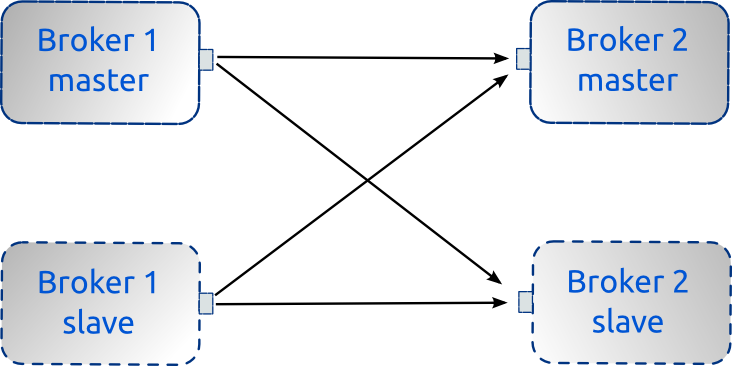
Consider an ActiveMQ network of brokers configuration of two nodes where each node also needs to be highly available. To achieve High Availability, each node needs to have a slave broker attached like in the following picture:


As shown in the above figure, Master Broker 1 needs to be able to create a network bridge to either Master Broker 2 or in case it is unavailable, Slave Broker 2.
Likewise if Master Broker 1 dies, Slave Broker 1 will take over and it also needs to be able to connect to either Master or Slave of Broker 2.
That way you can achieve high availability of all broker instances in a network of brokers. You already guess that such configuration can become really complex for a larger number of brokers in the network (also depending on the cluster topology).


The configuration of Master/Slave is decently well explained in the ActiveMQ documentation. But how do we configure the brokers network connector so that the network bridge is able to failover to a slave if the master crashes?

When trying to setup a bridge from Master Broker 1 to the master/slave pair of Broker 2, a configuration like

<networkConnector name="NC_1"
    uri="static://(tcp://broker2Master:61616,tcp://broker2Slave:61616)"/>


won’t be ideal. Because of the static: url list, the network connector will try to connect to both Master Broker 2 and Slave Broker 2. It will connect to Master Broker 2 just fine but will also retry connecting to Slave Broker 2 forever. Any failed attempt will be logged inside Broker 1 with a warning

WARN | Could not start network bridge between vm://localhost and tcp://broker2Slave:61616 due to: java.net.ConnectExcption: Connection refused.


This does not only pollute the log file and makes it harder to spot any other issues in the log but it also takes some amount of CPU every couple of seconds for trying a reconnect.

Side note: When using static:// in the network connector uri, lost connections will be re-established automatically. On this regards it works like the failover protocol but it tries to connect to all urls in the list.

Instead of trying to connect to all brokers specified in the above network connector uri list (i.e. Master Broker 2 and Slave Broker 2), we only want the bridge to connect to one broker of the list. Therefore a better idea is to use the failover:// protocol inside the network connector configuration. We only want the Master Broker 1 to connect to either Master Broker 2 or Slave Broker 2 but not both. So the configuration now becomes

<networkConnector name="NC_1"
   uri="static:failover:(tcp://broker2Master:61616,tcp://broker2Slave:61616)?randomize=false"/>


By also setting randomize=false we will always try connecting to Master Broker 2 first, before attempting to connect to the Slave Broker 2. This configuration will keep trying to connect to one of the two brokers until a connection gets established. It will not try to connect to both brokers in the list!

This configuration however still has a problem.
In case of a connection loss the failover transport will keep trying to reconnect to the specified urls transparently and will not propagate any exceptions up to the higher layer. So if after a crash of the Master 2 broker the Slave 2 broker has finally started up, the tcp transport connection will get re-established transparently by the failover transport in Master Broker 1 without flagging the loss of connection to any higher layers. That implies the broker’s discovery agent that is responsible for creating the network bridge will never be notified and hence will never try to re-create the network bridge (which involves exchanging a couple of messages between brokers). 

You can confirm this in jconsole, looking at the bridge MBean. The name of the MBean will refer to the previous master broker whereas the RemoteAddress property got updated with the new master broker.
Prior to version 5.6 the bridge would most likely not work anymore. Things have improved in 5.6 thanks to the fix of AMQ-3542 and the bridge may continue to work but the original problem remains. The bridge need to get re-established after failing over.

So what is needed to re-establish the network bridge after a failover? The solution is to use the failover transport for trying to connect to the urls in the connection list without any reconnects. 
When the tcp connection of the bridge is lost, the failover protocol will not try to reconnect but raise an exception to the DiscoveryAgent. The agent will clean up its bridge and ask the underlying failover transport to re-establish a connection to either master or slave of Broker 2. Now the failover transport will try all urls in its list only once, it won't attempt any reconnects on its own. If it still can't connect, it raises an exception back to the agent again, which after a timeout will ask the failover transport again to reconnect. This continues until the failover transport succeeds in connecting to one of the specified urls. Once the tcp connection is established, the DiscoveryAgent can recreate the bridge based on the new connection.
By not letting the failover transport reconnect on its own, the DiscoveryAgent is now aware that the connection of the network bridge got lost (as the error was propagated) and will re-establish the network bridge once the connection got restored. 

The failover transport needs to be explicitly configured to not reconnect on its own but raise an exception instead. By default it will reconnect forever.
From version 5.6 onwards, you should use the failover property maxReconnectAttempts=0 for that reason.

So the network bridge configuration finally becomes (for versions 5.6 onwards):

<networkConnector name="NC_1" uri="static:failover:(tcp://broker2Master:61616,tcp://broker2Slave:61616)?randomize=false&maxReconnectAttempts=0"/>


Also from version 5.6 onwards you will be able to use "masterslave:" instead of "static:failover:()". So the above example becomes


<networkConnector name="NC_1" uri="masterslave:(tcp://broker2Master:61616,tcp://broker2Slave:61616)"/>

See AMQ-3564 for more details but "masterslave:" simply maps to 
"static:failover:()?randomize=false&maxReconnectAttempts=0"

Prior to version 5.6 you cannot really configure for no reconnects. A value of 0 means "reconnect forever". From version 5.6 the value 0 means "do not reconnect". See the updated failover transport reference.


So for versions < 5.6 instead use maxReconnectAttempts=1 and allow one reconnect, which by default happen within 10 milliseconds (unless configured otherwise using initialReconnectDelay property of the failover transport). This is generally to short for the slave broker to take over. 


The network bridge configuration for Slave Broker 1 would be the same as it also needs to connect to either Master Broker 2 or Slave Broker 2. 

Summary: When trying to setup a network bridge to a master/slave broker pair, use the failover transport with maxReconnectAttempts=0.

Side note: When the remote broker is shutdown gracefully, the network bridge will get unregistered and closed down so that the discovery agent will always be aware of it. In that case the network bridge will be re-established correctly when the remote broker gets restarted even when not setting maxReconnectAttempts. But it won’t help in case the remote broker crashes.

26 Jul 2011

Error handling in Camel for JMS consumer endpoint


As of version 2.0 Camel now uses the DefaultErrorHandler out of the box. It offers a more Java-like error handling in the way that any exceptions that occur while routing the message will be propagated back to the caller while also ending the Exchange immediately. See the Camel error handling documentation for more details.

This is great for most use cases but not the best choice for every scenario. For illustration purposes lets consider the example of using Camel as a JMS bridge (although the following applies to any Camel route starting with a jms consumer endpoint).

Here’s a simple Camel route definition that routes messages from Apache ActiveMQ to IBM WebSphere MQ:


<camelContext id="camel" xmlns="http://camel.apache.org/schema/spring">
  <route>
    <from uri="activemq:queue:GatewayToWebSphereMQ"/>
    <to uri="webspheremq:queue:FromActiveMQ"/>
  </route>
</camelContext>


I leave out the Spring bean definition of the activemq and webspheremq JMS components for simplicity.
This route will forward any messages sent to the ActiveMQ queue "GatewayToWebSphereMQ" to a queue called "FromActiveMQ" in WebSphere MQ.

Now lets see what happens if WebSphere MQ is down for whatever reasons.
If a new message is put on the GatewayToWebSphereMQ, it will be picked up by the camel-activemq component. This component uses AUTO_ACKNOWLEDGE mode by default. That means Camel will receive the message from the broker and ack it straight away, before routing the message any further. From the point of view of the broker, the message has been consumed and in fact the message is now entirely in the hands of Camel.

So after acking the message, Camel will now try to route the message, i.e. sending it to WebSphere MQ. But the other end is down, so we won’t get a tcp connection established. Instead some sort of a socket exception will be thrown.
This is where the error handling in Camel comes into play now.

From Camel 2.0 onwards the DefaultErrorHandler will be called. The default behavior of this error handler is to propagate the error back to the caller. In this example this isn't possible as the camel-jms component has already consumed and acked the message. So it cannot raise the exception to the broker nor can we put the message back on top of the queue. Instead what happens is the message gets discarded (without being stored anywhere) after logging the error. So the message is basically lost. This is certainly not ideal if you cannot afford to loose messages.

There are a few solutions:

1) The DefaultErrorHandler will by default not try to redeliver the message. You can configure the error handler for a different redelivery policy so that it attempts to redeliver the message a couple of times before giving up in the hope that WebSphere will have restarted within that time frame. However when finally giving up on the retries, the message would still be discarded and lost.


2) If you can't afford to loose messages the better solution is to use a different Camel error handler, i.e. the Dead Letter Channel. This handler will move the message to a configurable dead letter queue if it cannot be routed.
Here is a sample configuration for a dead letter channel:


<bean id="myDeadLetterErrorHandler" class="org.apache.camel.builder.DeadLetterChannelBuilder">
  <property name="deadLetterUri" value="activemq:queue:ActiveMQ.DLQ"/>
  <property name="redeliveryPolicy" ref="myRedeliveryPolicyConfig"/>
</bean>

<bean id="myRedeliveryPolicyConfig" class="org.apache.camel.processor.RedeliveryPolicy">
  <property name="maximumRedeliveries" value="3"/>
  <property name="redeliveryDelay" value="5000"/>
</bean>


Now lets tell Camel to use this error handler instead of the default handler:


<camelContext id="camel" xmlns="http://camel.apache.org/schema/spring">
  <route errorHandlerRef="myDeadLetterErrorHandler">
    <from uri="activemq:queue:GatewayToWebSphereMQ"/>
    <to uri="webspheremq:queue:inbound/inbox"/>
  </route>
</camelContext>


This example configures the dead letter channel with a custom redelivery policy. Camel will now retry every message three times with a 5 seconds delay. If delivery is still unsuccessful thereafter, the msg gets moved to the queue "ActiveMQ.DLQ" in ActiveMQ. If the connectivity problem to WebSphere MQ is only short term, a properly configured redelivery policy may prevent moving any messages to a dead letter queue.
You can configure for any other dead letter queue and in fact it does not necessarily have to be a JMS queue, as "seda:errorqueue" will also work.

This configuration of a Camel error handler will never loose any persistent messages! However you will need to think of a strategy what to do with messages ending up on a dead letter queue (e.g. manually re-route them back to the original queue after the connection to WebSphere MQ got restored).


3) A third possible solution would be to use a transacted Camel route. For transacted routes theTransactionErrorHandler is used. The camel-jms endpoint is a transaction capable endpoint, and so do ActiveMQ and WebSphere MQ support transactions. The entire Camel route above could therefore spawn a single transaction. If there are any errors encountered within the transaction (e.g. while trying to send the message to WebSphere MQ), the transaction will be rolled back and the message is moved back to the original queue again (in fact, it never leaves the queue).
Now you require an appropriate redelivery policy configuration inside ActiveMQ (e.g. try to redeliver the message up to 5 times before moving the message to a dead letter queue "ActiveMQ.DLQ").
Further as the Camel route involves two different JMS endpoints, you would need to configure Camel for XA transactions, involving an XA transaction monitor. XA transactions also have an impact on performance and might not always be needed. The Camel Transaction Guide on FuseSource.com has some really good chapters on configuring Camel for XA transactions.

The second solution outlined above might be the easiest solution that guarantees messages won’t get lost.

1 Jun 2011

java.io.InvalidClassException: NoSuchCustomerException; local class incompatible: stream classdesc serialVersionUID = 20110530114741


While working on a camel demo that routes a soap message in POJO mode from a cxf-consumer endpoint via jms to a camel processor, I ran into the above exception when the camel processor returned a soap fault. The full error reads [1].

The Camel route definition is as simple as


<route id="CXF-to-Queue">
<from uri="cxf:bean:customer-ws?dataFormat=POJO"/>
<inOut uri="activemq:queue:lookupCustomer?jmsMessageType=Object&transferException=true"/>
</route>

<route id="Queue-to-Processor">
<from uri="activemq:queue:lookupCustomer?jmsMessageType=Object&transferException=true" />
<process ref="lookupCustomer"/>
</route>


I ran each Camel route on a different machine with both routes connecting to the same broker. Further all msgs were passed as ObjectMessages in JMS (but you would get the same issue with JMS ByteMessages or any binary serialization of the exception).
The SOAP fault (raised by the lookupCustomer processor) was marshaled into the JMS ObjectMessage correctly and sent back on the reply-to queue, but the receiving camel-jms endpoint (my first route) had problems unmarshaling the data and raised the InvalidClassException as shown above.

After some digging I got to learn that since I re-compiled my demo on the other machine, a new and different serialVersionUID was generated for NoSuchCustomerException.java:


@WebFault(name = "NoSuchCustomer",
targetNamespace = "http://demo.fusesource.com/wsdl/CustomerService/")
public class NoSuchCustomerException extends Exception {
public static final long serialVersionUID = 20110530174707L;
...
}


This serial version uid is generated based on a time stamp by default! So each time wsdl2java is re-run, a different uid will be generated. This is often the case with mvn based projects. As I compiled my demo on both machines (at different times), the uid differed.

There was an easy fix to it however, which is to tell the wsdl2java compiler to generate the serial version uid based on the fully qualified classname (-useFQCNForFaultSerialVersionUID). This will always generate the same uid for the same fault definition no matter how often I run wsdl2java. See http://cxf.apache.org/docs/wsdl-to-java.html for more information.

IMHO, -useFQCNForFaultSerialVersionUID should be the default in order to avoid such problems.


You won't have this problem when using SOAP/HTTP as the transport. The JAXB marshaling won't marshal the uid.
This problem only arises when using binary transports such as JMS.


[1] full error
org.apache.camel.RuntimeCamelException: Failed to extract body due to: javax.jms.JMSException: Failed to build body from bytes. Reason: java.io.InvalidClassException: com.fusesource.demo.wsdl.customerservice.NoSuchCustomerException; local class incompatible: stream classdesc serialVersionUID = 20110530114741, local class serialVersionUID = 20110530112224. Message: ActiveMQObjectMessage {commandId = 61, responseRequired = false, messageId = ID:nbwfhtmielke-1657-1306750363546-3:1:1:1:4, originalDestination = null, originalTransactionId = null, producerId = ID:nbwfhtmielke-1657-1306750363546-14:1:1:1, destination = queue://reply.test1, transactionId = null, expiration = 0, timestamp = 1306755695062, arrival = 0, brokerInTime = 1306755696022, brokerOutTime = 1306755696678, correlationId = ID-XPS-53828-1306755653494-0-6, replyTo = queue://reply.test1, persistent = true, type = null, priority = 4, groupID = null, groupSequence = 0, targetConsumerId = null, compressed = false, userID = null, content = org.apache.activemq.util.ByteSequence@ed92dbb, marshalledProperties = org.apache.activemq.util.ByteSequence@5449579a, dataStructure = null, redeliveryCounter = 0, size = 0, properties = {Content_HYPHEN_Type=text/xml;charset=UTF-8, operationNamespace=http://demo.fusesource.com/wsdl/CustomerService/, operationName=lookupCustomer, Host=localhost:10443, SOAPAction="http://www.example.org/CustomerService/lookupCustomer", User_HYPHEN_Agent=Jakarta Commons-HttpClient/3.1, CamelJmsDeliveryMode=2, accept_HYPHEN_encoding=gzip,deflate}, readOnlyProperties = true, readOnlyBody = true, droppable = false}
at org.apache.camel.component.jms.JmsBinding.extractBodyFromJms(JmsBinding.java:158)[camel-jms-2.5.0-fuse-00-00.jar:2.5.0-fuse-00-00]
at org.apache.camel.component.jms.JmsMessage.createBody(JmsMessage.java:183)[camel-jms-2.5.0-fuse-00-00.jar:2.5.0-fuse-00-00]
at org.apache.camel.impl.MessageSupport.getBody(MessageSupport.java:41)[camel-core-2.5.0-fuse-00-00.jar:2.5.0-fuse-00-00]
at org.apache.camel.component.jms.reply.ReplyManagerSupport.processReply(ReplyManagerSupport.java:112)[camel-jms-2.5.0-fuse-00-00.jar:2.5.0-fuse-00-00]
at org.apache.camel.component.jms.reply.TemporaryQueueReplyHandler.onReply(TemporaryQueueReplyHandler.java:52)[camel-jms-2.5.0-fuse-00-00.jar:2.5.0-fuse-00-00]
at org.apache.camel.component.jms.reply.PersistentQueueReplyHandler.onReply(PersistentQueueReplyHandler.java:45)[camel-jms-2.5.0-fuse-00-00.jar:2.5.0-fuse-00-00]
at org.apache.camel.component.jms.reply.PersistentQueueReplyManager.handleReplyMessage(PersistentQueueReplyManager.java:84)[camel-jms-2.5.0-fuse-00-00.jar:2.5.0-fuse-00-00]
at org.apache.camel.component.jms.reply.ReplyManagerSupport.onMessage(ReplyManagerSupport.java:98)[camel-jms-2.5.0-fuse-00-00.jar:2.5.0-fuse-00-00]
at org.springframework.jms.listener.AbstractMessageListenerContainer.doInvokeListener(AbstractMessageListenerContainer.java:560)[spring-jms-3.0.5.RELEASE.jar:3.0.5.RELEASE]
at org.springframework.jms.listener.AbstractMessageListenerContainer.invokeListener(AbstractMessageListenerContainer.java:498)[spring-jms-3.0.5.RELEASE.jar:3.0.5.RELEASE]
at org.springframework.jms.listener.AbstractMessageListenerContainer.doExecuteListener(AbstractMessageListenerContainer.java:467)[spring-jms-3.0.5.RELEASE.jar:3.0.5.RELEASE]
at org.springframework.jms.listener.AbstractPollingMessageListenerContainer.doReceiveAndExecute(AbstractPollingMessageListenerContainer.java:325)[spring-jms-3.0.5.RELEASE.jar:3.0.5.RELEASE]
at org.springframework.jms.listener.AbstractPollingMessageListenerContainer.receiveAndExecute(AbstractPollingMessageListenerContainer.java:263)[spring-jms-3.0.5.RELEASE.jar:3.0.5.RELEASE]
at org.springframework.jms.listener.DefaultMessageListenerContainer$AsyncMessageListenerInvoker.invokeListener(DefaultMessageListenerContainer.java:1058)[spring-jms-3.0.5.RELEASE.jar:3.0.5.RELEASE]
at org.springframework.jms.listener.DefaultMessageListenerContainer$AsyncMessageListenerInvoker.executeOngoingLoop(DefaultMessageListenerContainer.java:1050)[spring-jms-3.0.5.RELEASE.jar:3.0.5.RELEASE]
at org.springframework.jms.listener.DefaultMessageListenerContainer$AsyncMessageListenerInvoker.run(DefaultMessageListenerContainer.java:947)[spring-jms-3.0.5.RELEASE.jar:3.0.5.RELEASE]
at java.lang.Thread.run(Thread.java:636)[:1.6.0_20]


23 Mar 2011

ServiceMix with LDAP based authentication


It’s possible to configure LDAP based authentication in ServiceMix. We recently added a complete tutorial in the FUSE ESB Security Guide. It provides step-by-step instructions and screenshots based on the Open Source LDAP server ApacheDS.
Anyone having to configure LDAP in SMX, check out chapter 4 "LDAP Authentication Tutorial".

10 Mar 2011

How to SSL enable the ServiceMix web console?


ServiceMix 4 comes with a useful web console. It needs to be installed manually; it is not deployed out of the box:

karaf@root> features:install webconsole


... and thereafter the console can be accessed using URL:
http://localhost:8181/system/console/bundles
(applies to 4.3.1, URL might differ on other versions of SMX).

In order to secure the console to use HTTPS, it is necessary to create a file

$KARAF_HOME/etc/org.ops4j.pax.web.cfg

and configure it using any of the property keywords defined in this WebContainerConstants class.

Here is a possible example:


# configures the SMX Web Console to use SSL
#
# @SeeAlso: https://github.com/ops4j/org.ops4j.pax.web/blob/master/pax-web-api/src/main/java/org/ops4j/pax/web/service/WebContainerConstants.java
# for possible configuration properties

org.osgi.service.http.enabled=false
org.osgi.service.http.port=8181

org.osgi.service.http.secure.enabled=true
org.osgi.service.http.port.secure=8183

org.ops4j.pax.web.ssl.keystore=/path/to/keystore.ks
org.ops4j.pax.web.ssl.keystore.type=JKS
org.ops4j.pax.web.ssl.password=blah
org.ops4j.pax.web.ssl.keypassword=bluh
org.ops4j.pax.web.ssl.clientauthwanted=false
org.ops4j.pax.web.ssl.clientauthneeded=false


Make sure to access the web console using https:// after applying this configuration.
;-)

24 Feb 2011

Observations on ActiveMQs temp storage.


In ActiveMQ there are 3 areas where messages are stored by the broker: in broker's memory, in persistence store and in temp storage.
All messages get first put into the broker's memory until it fills up. Persistent messages always get additionally saved to the persistence store (KahaDB by default). Non persistent messages are held in memory until broker memory is exhausted. Then, if the default FileCursor is used, they get swapped out to disk (swapping does not happen with VMCursor). The temp storage typically resides in directory data/localhost/tmp_storage.

All three areas are configured in activemq.xml using

<systemUsage>
<systemUsage>
<memoryUsage>
<memoryUsage limit="20 mb"/>
</memoryUsage>
<storeUsage>
<storeUsage limit="1 gb"/>
</storeUsage>
<tempUsage>
<tempUsage limit="100 mb"/>
</tempUsage>
</systemUsage>
</systemUsage>


An important advice is to never set the tempUsage limit below the journalFileSize for the temporary storage (32 MB by default but configurable)! So if you don't explicitly configure the journaleFileSize for temp messages in KahaDB, never set the tempUsage limit below 32 MB!

This configuration will most likely cause problems

<tempUsage>
<tempUsage limit="30 mb"/>
</tempUsage>


Here is the reason why:

The temp storage is only used with non-persistent messages, so typically with topic messages.
In the case of running fast subscribers that keep up with the producers, you will most likely never need to swap messages as all outstanding messages can all be held in memory.
There may be peak times however where the producer rate is higher than the rate for consuming messages. So swapping of messages might occur.

When a subscription realizes that there is no further heap memory to take on new messages (due to whatever configured memory limit), it will start to swap out all messages it holds to temp storage. All messages of a particular subscription get swapped in one go! That process is rather slow and for a larger amount of messages to be swapped might easily take a few mins.

Side Note 1: The dispatching of topic messages to each topic subscription inside the broker is serialized. If a topic has 5 subscribers then a new message gets dispatched to each subscription in a serialized manner. The first subscription that tries to handle a new message might realize that memory is full and starts to swap all of its yet undelivered messages. The swapping is actually done by the FilePendingMessageCursor. After swapping messages to temp storage, the subscription can handle the new message and send it to the external client. There is one FilePendingMessageCursor instance for each subscription. The next subscription is only called once the previous subscription has sent the message and will then normally find enough space in heap memory again to handle the new message in memory. If not, it will start to swap out its messages too to free more heap.

Side Note 2: Because of all messages being swapped in one go by a subscription, it may happen that after the swap has finished the temp storage is above 100% usage. This might occur either when
1) using a memoryUsage > tempUsage and the subscription holds a large amount of messages, but also
2) when configuring a tempUsage limit < 32 MB (see above).

In the case 1) it is possible that the amount of messages held in a subscription is larger than the tempUsage limit. So after swapping all messages of a subscription into temp storage, the tempUsage is > 100%.
In case 2) once swapping starts, the persistence adapter (which is also responsible for writing messages to temp storage) will create a db-1.log file in temp storage and its default file size is 32 MB. Again tempUsage is > 100% after writing this file irrespective of how many messages got swapped to temp storage.
You might see the following log statement in the broker log file when temp storage has filled up after messages got swapped to disk.


INFO TopicSubscription - TopicSubscription: consumer=ID:nbwfhtmielke-1380-1298467525966-2:1:1:1, destinations=1, dispatched=99, delivered=9622, matched=231, discarded=0: Pending message cursor [org.apache.activemq.broker.region.cursors.FilePendingMessageCursor@3c0737] is full, temp usage (129%) or memory usage (0%) limit reached, blocking message add() pending the release of resources.


With producer flow control enabled, any producers will be put on hold until the swapping of messages has finished (and additional heap memory is available) and also until the tempUsage < 100%. Subscribers still get messages dispatched while tempUsage > 100%, only producers are stopped. Any consumed messages free additional space from temp storage. Once the temp usage is < 100% producers get resumed.

As messages get consumed the data files get deleted from temp storage. All except for the first file which will be reused in case any of new messages that need to be swapped.

And there is the problem: The first data file never gets deleted. Its default size is 32 MB and hence still above the configured tempUsage limit (30 MB in our example). As the file never gets deleted, tempUsage never goes < 100% and therefore the producer is flow controlled forever and never gets resumed.
From an external viewpoint it seems as if either the broker or the producer is hung. The subscribers have consumed all message but producers don't send any further messages.

Some more useful notes on broker memory configuration can be found here.

Lesson learned:
  • Don't configure a tempUsage limit < default size of the journal file (32 MB).

  • Swapping out messages to temp storage can be rather slow. If you already using producer flow control with topic messages, the VM cursor might be an alternative. It won't swap messages to disk.


23 Feb 2011

Load tests with ActiveMQ


Not sure everyone knows it but ActiveMQ has a maven plug-in that can be easily used to run load tests. Its name is maven-activemq-perf-plugin. Full documentation is available here.
As I often need to run test using a specific broker configuration or having to test a specific broker feature, this plug-in has helped me a few times already. It is also highly useful for trouble shooting as the many configuration options allow you to simulate certain broker usage patterns.

You have many options for setting up the load test like the number of producers and consumers, the message size, acknowledge mode, using Queues or Topics, whether to use JMS transactions and many more.
It also includes samplers that measure your performance; you get a nice summary written at the end of the test run.


In order to use the test suite, simply add it the plug-in to your pom. An example is given here.

I highly recommend it to anyone who wants to quickly run some load tests and measure broker throughput.